2019-07-28
Haven't got any code updates, but it's worth doing a quick entry just update where I'm at, and to clarify the next steps...
Right now I'm looking at beautifying the UI. I'd originally assumed I'd use Material Design since I like its aesthetics, I'd used it successfully in a previous project. But now I'm having second thoughts for two reasons...
- I find that Material Design is not that easy to setup. The documentation seems comprehensive as a reference manual, but in terms of getting the basics working in my simple Angular project it doesn't seem to provide much practice guidance or example (so right now I'm spending more time sorting out npm dependency issues between material design and angular, than writing actual code).
- I've looked at Semantic UI which a colleague is using for one of their projects, and that looks pretty nice, and simple to setup and configure.
Since the project is still in a very simple state, I'll probably build UI examples using both frameworks (if I can find the patience to get Material Design working), and decide between them after that. Following that the next steps will be...
- Build a common error handling library in Typescript... i.e. something that can catch UI-side errors, store/log them for audit and debugging purposes, but that can also feed into 'nice' display for the user (e.g. a popup notifying them that something went wrong).
- Build a common logging library... potentially something that can buffer log entries in UI code and periodically call the backend to persist them.
- Check that the Swagger generated by the C# ApiControllers are properly documented (i.e. all of the required method and parameter documentation is set, and is propagating through to Swagger).
- Build unit tests for the Typescript code (this will be required for the above error handling and logging libraries anyway).
- Build automated deployment routines (including running tests in Typescript and C#, and deploying to AWS).
2019-07-14
Github tag 0.3.0.0
Continuing with CORS configuration, and overcoming the 'Cross-Origin Request Blocked' errors I was getting from Firefox in my previous post... I realized my understanding of CORS, and specifically where the 'Access-Control-Allow-Origin' headers needed to be was not 100% correct. I was under the impression it was the UI/front-end HTTP response which should include these headers... i.e. the front-end nominating which URL(s) it was expecting to connect to, and in doing so, protecting the front-end code from accessing malicious backend services (e.g. as could be a problem for websites which have dynamic injected content from 3rd parties like banner ads). However, according to this Microsoft article, matching 'Access-Control-Allow-Origin' headers need to be set on the backend/API HTTP request and response messages. The goal of CORS is actually to protect a backend service from being accessed by front-end code which it doesn't know about, or doesn't allow.
Through experimenting and trying to figure out how to make this all work, I noticed that the HTTP requests sent from the NodeJS server hosting the UI/front-end pages (from the 'ng serve' command), seem to be including the correct 'Origin' header out of the box...
So, at the end of the day, all that needs to be done to get things working is to have the .NET code send the correct 'Access-Control-Allow-Origin' headers in its HTTP responses. Configuring this in .NET Core is dead simple following Microsoft's instructions (see changes to Startup.cs)... although be careful not to do as I did, and mistakenly follow the equivalent instructions for regular (non-Core) ASP.NET, and then spend an hour trying to figure out why things don't see to be working!
The backend services are now returning the following HTTP responses...
Having CORS configured simply like this is good. The application front-end could be hosted using several different technologies (IIS, Apache, NodeJS), and the NodeJS instance that's used by the Angular 'ng serve' command for local development will likely not be the same technology I use for test and production deployment. Hence if CORS config had to happen in the front-end code (or more correctly in the front end infrastructure), I'd have to figure out a nice way configure it properly for multiple different technologies, which would add to the complexity of the deployment process. By contrast the backend code will always be running in .NET Core hosted by IIS (even if I use AWS Elastic Beanstalk or Azure Web Apps, these are still just VM and infrastructure 'wrappers' around an IIS instance), so having the CORS configuration here means I can just use the same simple configuration for local, test, and production deployments. What I'll have to do at some stage is move the CORS configuration into external config (not hard coded as it is atm).
For next steps, I probably want to start building the deployment code around the current very simple code base (i.e. likely Jenkins workflows to deploy the current code base to AWS)... it's going to be important to keep both the application code, and the devops/deployment stuff move along in parallel. But I've also been reading a bit about WebAssembly... and am very keen to see if I can get some .NET code running in the browser side. This is a very exciting development, and I think opens up a lot of potential to simplify web applications (as a very simple example... writing a single library of ui/form validation code that can be run in the client and on the server). So, I might take a small detour, to see if I can get a simple example of this up and running.
2019-06-23
Github tag 0.2.0.0
I've setup a very basic page in Angular which shows the pixels of 3 different sample MNIST digits...
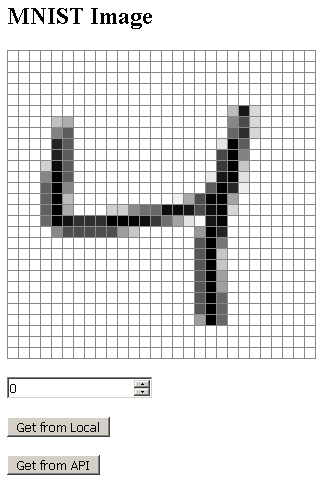
The two buttons at the bottom allow loading the MINST image from either the local Angular DigitImageService or from the remote .NET API Controller (via a call to httpClient.get()). Getting the image from the local service works fine... clicking on the 'Get From API' button results in the following error in Firefox...
In this case the Angular code was running through the 'ng serve --open' command, which hosts the Angular frontend through node.js, running on port 4200. The Web API was running through Visual Studio and IIS Express on port 9000. From the error message we can see that Firefox has blocked access to content running on a different port (i.e. on 9000) due to CORS.
The next step will be to set appropriate CORS headers in the response from the frontend page requests to allow access to the Web API. At the most basic level this should just require response headers to include the following...
... but may get more complex if Firefox is sending preflight HTTP OPTIONS calls.
The interesting bit will be how to set these response headers... I don't know whether it's possible to configure in the node.js instance started up by 'ng serve'... another option might be to host the Angular files through Visual Studio / IIS (if ultimately I host the frontend through elastic beanstalk this would be closer to the 'end state').
In any case, this CORS header configuration will be the next step.
2019-06-06 - First Post
Github tag 0.1.0.0
OK... my first post. My aim with this project was to try and blog regularly, but even though I've been scribbling down ideas and writing bits of code for 4-5 days, I still haven't collected a set of cohesive thoughts into a post... until now!
My first goal is to get a very rough framework of the main components of TryML up and running. One thing I'm conscious of (and which I think I mentioned in the intro) is that I want to keep the architecture very decoupled, and make sure I've got a lot of flexibility in deploying in different configurations with minimal change. Specifically, at a high level I want to have modular front-end, service layer, and storage/cache components which can be deployed in configurations ranging from everything being in a single VM on my laptop, to having all components separated and distributed on AWS (or another cloud provider) utilizing auto-scaling, load balancing, etc. So as a first step I want to create...
- A REST service layer with a single GET endpoint which serves up images from the MNIST database
- A single page Angular app which allows the user to read images from the endpoint and display them
Starting with this very basic context will allow me to experiment with, and decide on a couple of items which will have a greater effect on the overall design... specifically...
- CORS - CORS is a mechanism implemented by browsers to restrict and control access resources outside of the domain of the primary site. Practically it means that without proper configuration, my web application front end (e.g. hosted at www.mypage.net:80/index.html) would not be permitted to access the service layer on a different port (e.g. www.mypage.net:9000/api) or different domain (e.g. api.mypage.net). A simple way to overcome this is to ensure that service layer calls are available from the same base URL / port as the front end (e.g. www.mypage.net:80/api/). However, this could be at odds with my desire to keep things modular... it means that the services will either have to be hosted on the same web server instance as the front end, or at a minimum 'proxy' through the front end web server to access the services 'behind'. Either way it feels like those techniques will be reducing the modularity of the system, restricting the ability to host components in isolation, and increasing the coupling between components. I want to see if appropriate CORS configuration on the server side can allow the components to be served on different ports and URLs/IPs.
- Service Layer Deployment - I'm using .NET Core Web API for the initial service layer. I know this can be easily deployed to AWS Elastic Beanstalk (as I used that for previous projects) or Azure, or run in a local IIS instance. The question will be what happens when I want to potentially host individual microservices from different C# projects within a single IIS instance (and potentially sharing a URL and/or port) for testing etc. This might be possible with IIS, or I might have to look at deploying via Docker.
- Front End Deployment - I've built an AngularJS app before, and know from that that the front-end html and javascript are just static files (in my previous project served up by IIS locally, and Elastic Beanstalk when deployed). Developing in Angular 2 appears to be different, as you run a local web server using the 'ng serve' command... however from reading several pages today, it seems that after building the Angular 2 solution, the pages are again just static files which can be served up from any web server (I saw IIS, Apache, and NodeJS all mentioned). I need to mess around with this and figure out the best (and most decoupled / flexible) way to deploy. IIS seems like the easiest option (since I noticed tonight that Visual Studio 2017 has an 'Angular' project type), but I also read that it's possible to use AWS Cloudfront to simply host the static files directly from S3... that said I don't want to tie the project too tightly to one cloud provider... as I said, I need to experiment with a few different options and find out what's going to work best. One final though is... assuming the Angular 2 files are static, what do I do about things embedded within pages that feel like they need to be dynamic (thinking specifically about cookie handling). I do want to be able to identify users from visit to visit, and adjust content and preferences appropriately, so being able to use cookies (or an equivalent?? mechanism) is important.
Anyway, just to get the ball rolling, I've built a Web API project with a single endpoint (api/DigitImages/{id}) which serves up the pixels of 3 different MNIST images, and also created a shell Angular workspace and application. The next step will be to build a single Angular page (plus appropriate routing and service) to retrieve a selected image and display it. Then I can start playing around with CORS, and see what's possible.